

The HITACHI GHP handheld programmer is a service tool used for elevator inspection, commissioning, parameter adjustment, and operation monitoring. By connecting the GHP to the elevator inspection cabinet, technicians can access operating information and various service functions through the handheld interface.
For maintenance personnel working with compatible HITACHI elevator systems, understanding the basic GHP startup procedure, keypad functions, and menu structure can make service work more efficient.
GHP Handheld Programmer Startup Procedure
Before operating the GHP, make sure the connection and power supply are properly prepared.
The basic operation sequence is as follows:
1. Connect the GHP
Connect the GHP handheld programmer to the XHP inspection cabinet at the elevator landing.
2. Turn On the Power
Set the power switch to the 15V position.
3. Enter the Password
Enter the required six-digit password and press ENTER.
4. Confirm the Elevator Number
The GHP will display the elevator identification number from the previous operation.
If the displayed number corresponds to the elevator that will be serviced, press ENTER to continue.
If a different elevator needs to be selected, press RETURN and enter the correct elevator number.
5. Select the Elevator Model
After confirming the elevator number, select the applicable elevator model, such as UAS II, and press ENTER to enter the operation menu.
This initial identification process helps ensure that the GHP is connected to and operating with the intended elevator system.
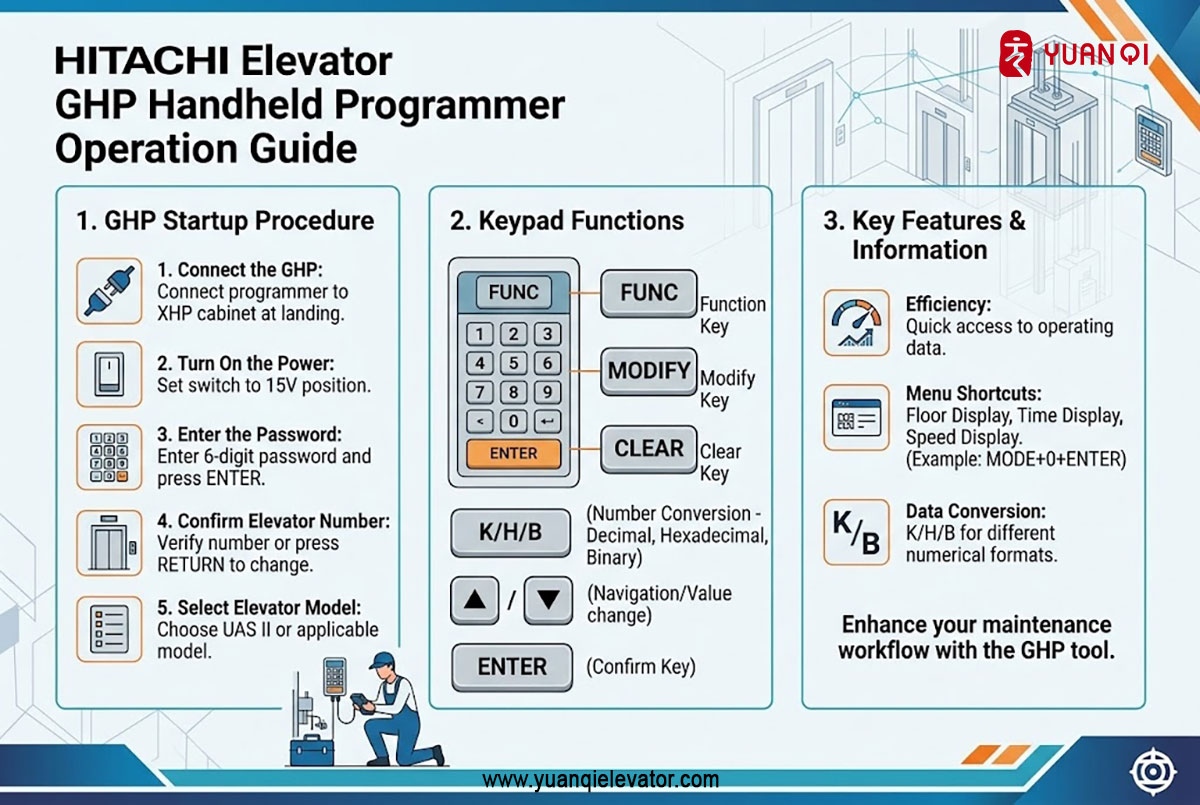
HITACHI GHP Keypad Functions
The GHP provides dedicated keys for data modification, menu navigation, operation control, and parameter input.
|
Key |
Function |
Description |
| FUNC | Function key | Reserved/auxiliary button |
| MODIFY | Modify key | Used to modify various data |
| CLEAR | Clear key | Deletes incorrect input and clears functions such as dedicated operation or floor-height measurement |
| K/H/B | Number-system conversion | Converts between decimal, hexadecimal, and binary formats |
| MENU | Menu key | Opens the available menu functions |
| RETURN | Shortcut key | Returns to the previous menu |
| ▲ | Up key | Moves upward, turns pages, or decreases a value |
| ▼ | Down key | Moves downward, turns pages, or increases a value |
| ENTER | Confirm key | Confirms an entry or validates an operation |
| START | Start key | Starts the selected operation |
| Door Stop | Door stop key | Prevents door operation |
| ● | Decimal point | Used when modifying elevator specification parameters |
| — | Minus key | Used when modifying elevator specification parameters |
| Other keys | Input keys | Used together with function keys for different input operations |
Data Conversion with K/H/B
The K/H/B key is used for number-system conversion. It supports conversion between:
- · Decimal
- · Hexadecimal
- · Binary
This function is useful when service data needs to be viewed or entered in different numerical formats.
MODIFY and CLEAR
The MODIFY key is used when changing applicable data or parameters.
The CLEAR key has two important functions: it can remove an incorrect entry and clear certain active service operations, including dedicated operation and floor-height measurement.
GHP Menu and Operation Information
The GHP menu provides access to basic elevator operating information.
The supplied menu structure includes an Operation Information section with functions such as:
|
Function |
Shortcut |
Description |
| Floor Display | MODE + 0 + ENTER | Displays the current floor |
| Time Display | MODE + 1 + ENTER | Displays time information |
| Running Count | — | Displays elevator operation count |
| Speed Display | MODE + 27 + ENTER | Displays operating speed |
| Operation Mode | MODE + 40 + ENTER | Displays the current elevator operating mode |
The shortcut combinations provide a convenient way for technicians to access frequently used monitoring functions.
Why the GHP Is Useful for Elevator Maintenance
A handheld programmer provides technicians with a direct interface for viewing elevator operating information and accessing applicable service functions.
Instead of relying only on physical inspection, technicians can use the GHP to check information such as floor position, operating speed, running count, and current operating mode.
This makes the tool particularly useful during elevator commissioning, inspection, troubleshooting, and maintenance.
Important Notes for GHP Operation
The GHP should be operated by qualified elevator maintenance personnel familiar with the corresponding HITACHI elevator control system.
The exact menus, parameters, and available functions may vary depending on the elevator model and control configuration. Before modifying elevator data or performing special operations, technicians should refer to the applicable service documentation and follow the required safety procedures.
Conclusion
The HITACHI GHP handheld programmer provides a practical interface for elevator service and system monitoring. Its dedicated keypad, number-system conversion function, menu shortcuts, and operating information functions allow technicians to access important elevator data efficiently.
Understanding the GHP’s basic connection procedure, keypad functions, and menu shortcuts can help improve the efficiency of daily HITACHI elevator inspection and maintenance work.
WhatsApp: 8618192988423
E-mail: yqwebsite@eastelevator.cn
Post time: Aug-31-2026